LabelPilot
LabelPilot
INDUSTRIAL LABELING SYSTEM
FeaturesHardwareBarcodesFAQ
Demo
Software for packing & labeling stations

Weigh it — label printed — data logged

LabelPilot turns weighing and labeling into a single error-free flow. The operator sets down a package and the label prints itself, with the right weight, batch and best-before date. The office plans the jobs, and the stations on the line carry them out both online and fully offline. Less waste, less weight given away for free, full traceability, and not a single wasted motion on every pack.

Windows 10 / 11·works offline·touch kiosk
LabelPilot · Labeling station
LabelPilot
Auto-print on stabilization
< 1 s
label printing
100%
offline operation
20+
barcode types
5+
scale protocols
Who it is forPacking floorsMeat · cheese · deliVeg · bakery · frozenProduction & warehousesRetail & wholesaleStation networks
Key advantages

One install — and the workstation is ready

01
Printing with no button presses
The weight settles and the label prints itself. The operator simply sets down the package and picks up the finished label, hands free. Every pack gets exactly one label: no double printing and no accidental printing on an empty platform. Higher line speed with the same crew.
02
Weight and net control
The station instantly shows the clean weight of the product, automatically deducting the weight of the packaging. For fixed weight, every pack is checked against tolerance: underweight and overweight are visible immediately, and printing outside tolerance is simply blocked. Less product given away for free, fewer claims and fines.
03
Automatic box and pallet counting
Packs are counted into a box on their own, and once the pack-out quantity is reached, a box label prints with the correct count and weight. Boxes are grouped into a pallet, and the pallet summary sheet prints in one touch. Nobody counts in their head — the warehouse and shipping get exact figures.
04
End-to-end traceability
Every pack, box and pallet gets its own unique number with a station tag. Batch, date and best-before are entered once and carry over to all labels on their own. Any unit can be traced back to the station and shift — you are ready for batch recalls, audits and inspections.
05
Works online and fully offline
With a network, the server instantly pushes the catalog, jobs and templates to the stations and collects output reports in real time. With no network, the same data is carried on a flash drive in protected form, and the station keeps printing. The connection drops — the line does not stop.
06
Any equipment you already have
Connect the scales you already have: CAS, Mettler Toledo, Massa-K, Shtrikh-M, Mertech, Dibal, A&D and others with a standard protocol — over cable or network. Printers — networked, over cable or via the Windows driver, any thermal printer. No need to replace your equipment fleet.
07
Frequent updates with data protection
We release updates regularly: they speed up the work and add new capabilities. Before each update, the server and stations back up the database and settings, and rolling back to a working version takes minutes. The update installs online or from a file at closed sites with no internet.
08
No IT department and no downtime
The server finds the stations on the network itself, and a new station is recognized when it powers on — with no manual setup. The link to the scales and printer is monitored, a break shows up at once with a clear message, and reconnection happens on its own. Clear prompts instead of frozen screens — the line loses no minutes.
How it looks in action

Client at the station and a server for the whole network

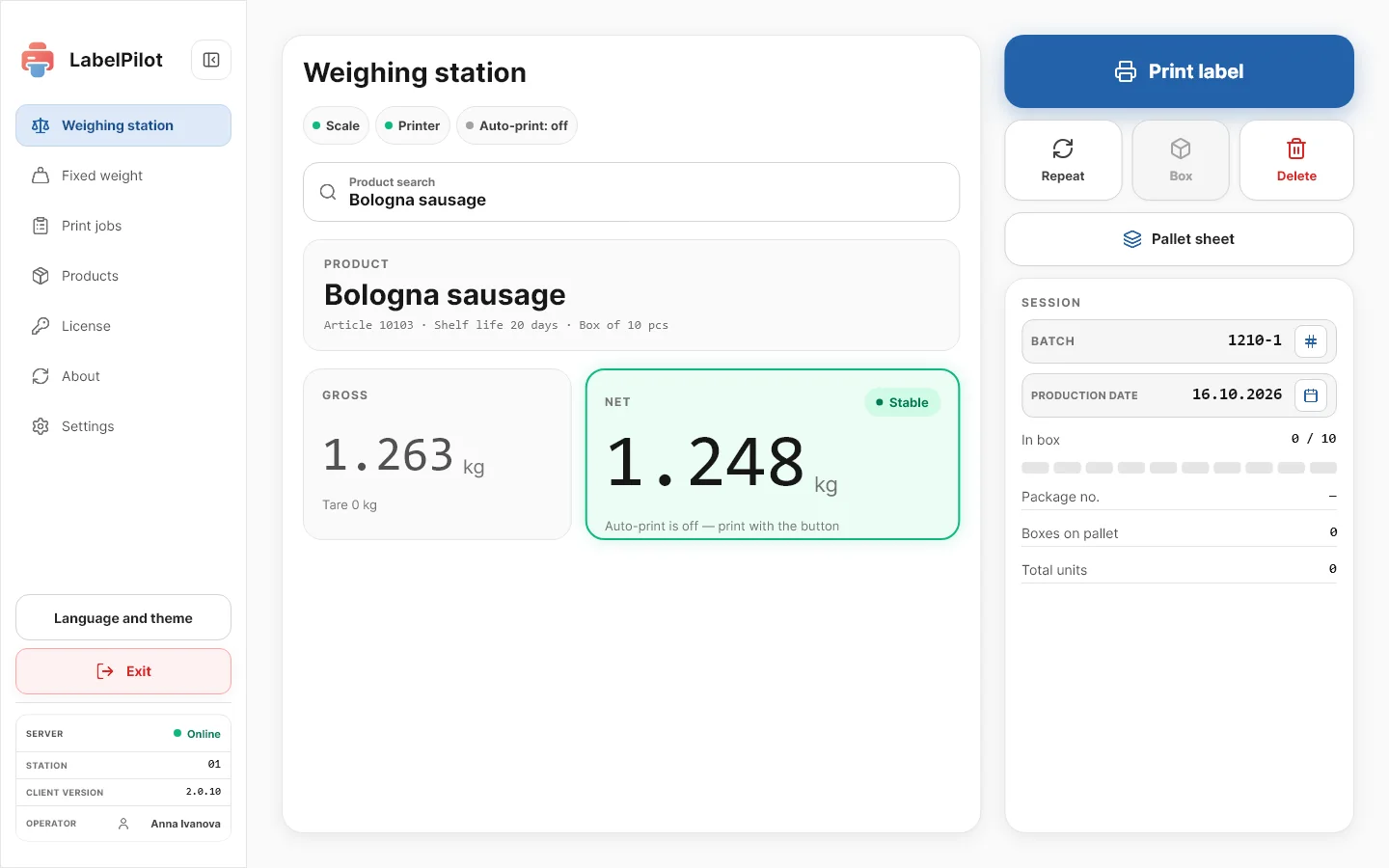
Client · Station

Weigh it, set it down, take the label

Live weight with automatic tare deduction — the operator sees the true product weight with no manual math
The label prints automatically the moment the weight settles, and the station gets itself ready for the next package
Trigger sensitivity to choose: fast, balanced, precise — a balance of speed and accuracy tuned to your product
Reprint of the last label in one touch and removal of a mistaken pack with automatic recalculation of the totals
Printing on its own by actual weight
Weigh it, set it down, take the label
Client · Fixed weight

Tolerances, batches and date on every pack

Every weight is checked against tolerance: a clear "in range" or "out of range" mark with exact grams
Printing outside tolerance is blocked — underweight or overweight physically cannot be labeled and shipped
Quantity mode: set the number of packs per box and number of boxes, and the batch prints itself with visible progress and a stop button
Batch and date are entered once, and the best-before is calculated automatically from the product's shelf life
Weight waste will not ship out
Tolerances, batches and date on every pack
Client · Jobs

Jobs from the office straight to the station

The office plans the runs centrally and sends each station its own worksheet — with no manual entry and no product errors
The station shows a live queue of jobs split into active and completed
Every label counts toward the job: progress in real time, and the order closes itself once the target is reached
The shift summary at hand: units per box, boxes per pallet, total output and the time of the last label
The line knows what to produce
Jobs from the office straight to the station
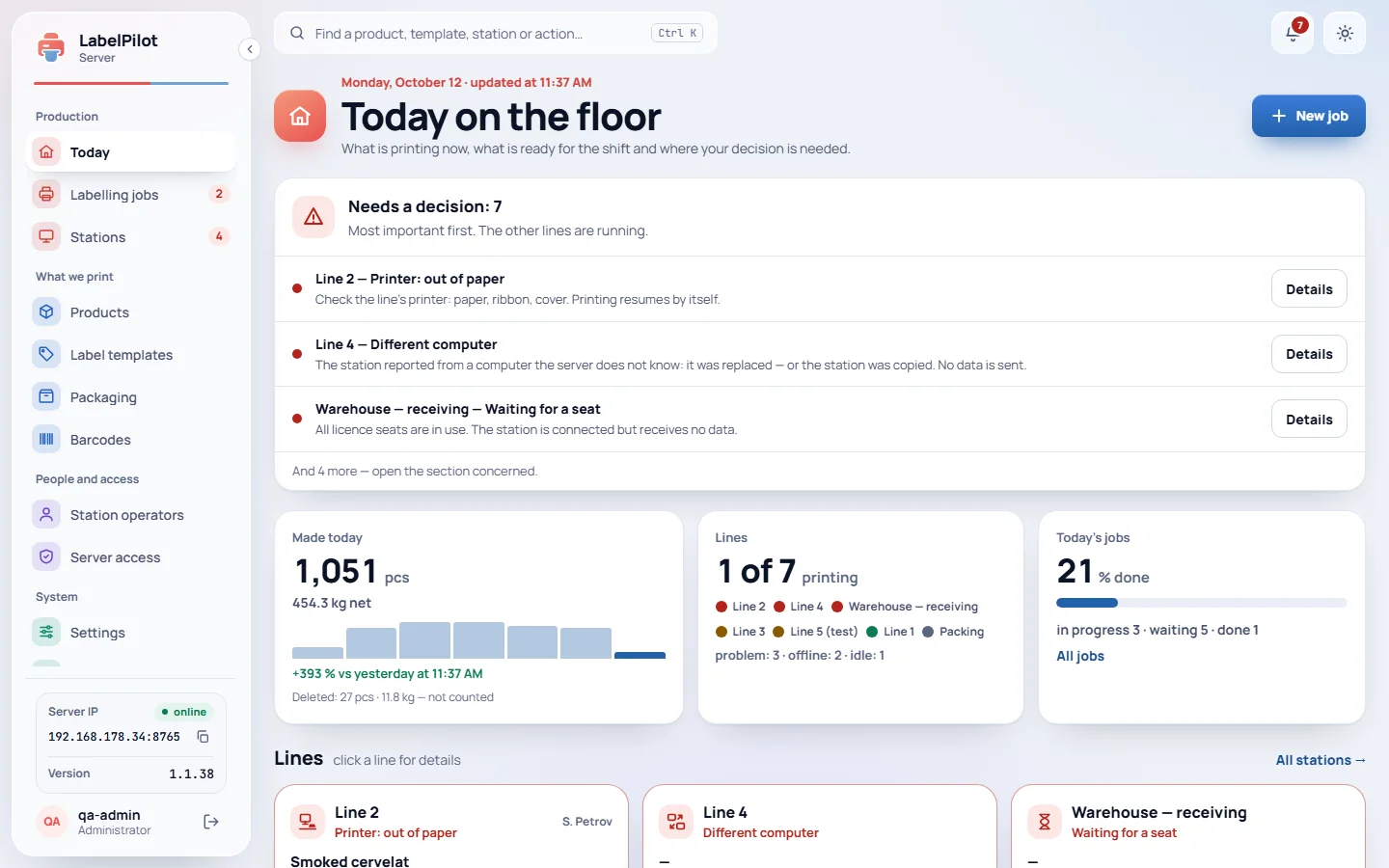
Server · Designer

Visual label builder

Drag-and-drop layout in real centimeters: text, frames, barcodes and tables sized to your roll
Full Cyrillic and bilingual labels print crisply, with no garbled characters
Product fields fill in on their own: name, item code, batch, dates, net and gross weight, operator
Barcodes from EAN and Code 128 to QR, Data Matrix and GS1 with automatic check-digit calculation — the data is always right
A label to your standard
Visual label builder
Server · Catalog

Product catalog in one place

Item code, shelf life, pack-out per box, fixed or floating weight with tolerances — all stored centrally
The catalog, label templates and barcodes are pushed to all stations in a single package — with no setup on each one
Loading thousands of items from Excel and CSV with column mapping and a preview, understands Russian-language exports
Fast product search and a card with weight and tolerances, so the operator confirms the right item
One source of truth
Product catalog in one place
Server · Stations

A network of stations under control

The server finds the stations on the network itself and sees which of them are online — with no manual setup
Changed a price, product or order — sent to the whole shop floor instantly, with delivery confirmation
Closed sites with no internet run on a flash drive: protected data exchange with integrity checks
Stations send output reports on their own, and on a network break they store them up and send them later, losing nothing
One server for the whole line
A network of stations under control

End-to-end pack tracking

Automatic aggregation and numbering: auto-close a box by limit, print the box label, box and pallet counters.

Pack
weight + barcode
Box
auto-close
Pallet
aggregation

Setting up a workstation

01
Set up the catalog
Load your products from Excel or CSV into the server's central catalog: item codes, weights, tolerances, shelf lives and pack-out per box. Thousands of items in minutes, with a preview and no duplicates.
02
Draw the label
Build a template in the visual builder sized to your roll: text, frames, tables and barcodes. Product fields fill in on their own, and Cyrillic and bilingual print crisply. One template for thousands of products.
03
Connect the scales and printer
Connect the scales — CAS, Mettler Toledo, Massa-K, Shtrikh-M, Mertech, Dibal, A&D and others with a standard protocol — over cable or network, and a printer — networked, over cable or via the Windows driver, any thermal printer. The link is monitored and reconnection happens on its own.
04
Start the line
Send jobs to the stations over the network or by flash drive. The operator sets down a package and the label prints itself with the right weight, batch and date, boxes and pallets close automatically, and output reports go to the office on their own.
Compatibility

Works with what is already on the floor

Scale connection
Cable (RS-232 / USB-COM) or network (TCP/IP), stabilization presets (fast / balanced / precise) and automatic reconnection on a break. A scale emulator is included for setup without hardware.
Printer connection
Network (TCP/IP, port 9100), cable (COM) or the Windows system driver — any thermal printers, not one brand or one interface.
Label printing
Separate printers for unit, box and pallet labels, with settings for resolution, size, density and print speed.
Network operation
Real-time online sync of the server with the stations and fully offline exchange via file/USB with data integrity checks.
Hardware
Windows 10 / 11, runs even on low-power POS PCs and all-in-ones; standard or touch screen, kiosk mode.
Supported printers
ZebraTSCHoneywellCABGodexSATOArgoxProtonXprinterBixolon
Supported scales
Масса-КCASMertechMettler ToledoШтрих-МDibalA&DEU/ASCII
Supported barcode symbologies
Code 128GS1-128EAN-13EAN-8UPC-AUPC-EITF-14Interleaved 2 of 5Code 39Code 93CodabarMSIGS1 DataBarGS1 DataBar ExpandedQRGS1 QRData MatrixGS1 Data MatrixPDF417AztecMaxiCode
Don't see your device? Send us the model — we add support promptly.
License

One license — no limits

A perpetual license for an unlimited number of workstations. Pay once — via Stripe. The key and license file arrive by email right after payment.

🔥 First 10 clients — lifetime, unlimited stations
Perpetual license
Lifetime
€1000
one-time, forever
Unlimited number of workstations
All stations and the network server
All barcode types and GS1
Label designer and templates
Updates and support
🔒Secure card payment via Stripe

Frequently asked questions

Is it suitable for GS1 Data Matrix marking?
Yes. Data Matrix and GS1 Data Matrix are supported with correct check digits (GTIN-14) and application identifiers (01)(17)(10)… — pixel-perfect.
Will it work without the internet?+
Will it run on an old POS PC?+
Which scales and printers are supported?+
How does networked operation work?+
How is the software updated?+

We will show LabelPilot on your products

Leave your contacts — we will set up a demo station with your catalog, connect it to a scale and printer and show printing live.

ZPL
Zebra · TSC · Honeywell
5+
scale protocols
GS1
Data Matrix ready
Name
Company and industry
Phone
By clicking the button you agree to data processing
LabelPilot
LabelPilot
Industrial Labeling System
© 2026 LabelPilot · Hryhorii Fedorovskyi